We do not have your recordings, and we have no way to get them
CamScribe is a macOS application that runs on your computer. It has no server of ours behind it, no account, and no HTTP client of its own. This page says what it does with your data and, more usefully, what it is structurally unable to do.
Last updated 3 August 2026
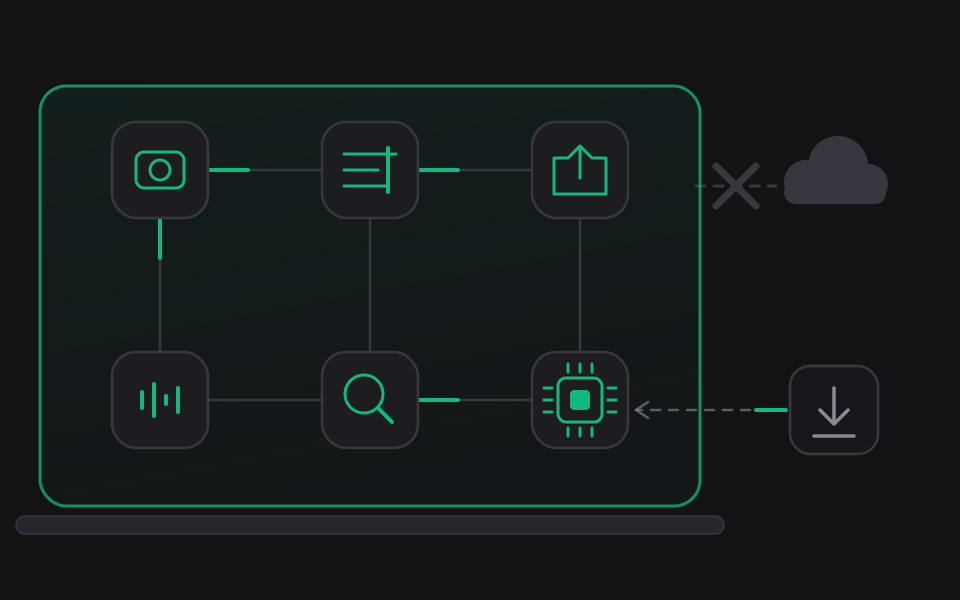
In short
- Olib AI receives nothing. There is no account, no sign in, no sync, no cloud storage and no upload. We do not operate a service that your copy of CamScribe talks to.
- Buying Pro is the one thing that uses the network, and it is Apple's request rather than ours. It carries your Apple Account and the transaction; it carries nothing about your recordings, and it reaches Apple rather than us. The detail is below.
- Your recordings stay where you put them. They are written to a folder inside your Movies folder, as ordinary files on your disk.
- There is no analytics of any kind. No telemetry, no crash reporting service, no advertising identifier, no third party SDK, no cookies, no fingerprinting.
- Transcription runs on your Mac, using the operating system's own speech models. Your audio is not sent anywhere to be transcribed.
- No model was trained on customer media. Every machine learning model that ships with CamScribe was trained on procedurally generated data, and each one records that fact in its own manifest entry.
What we collect
Nothing. Olib AI does not collect, receive, store, sell or share any personal information through CamScribe. The application contains no HTTP client of its own and makes no outbound network request in the course of recording, editing, exporting or searching.
That is unchanged by CamScribe being paid software. A purchase is a transaction between you and Apple. Apple tells us how many copies of each product sold, in the aggregate reports it gives every developer. We do not learn who you are, we never see your name, your email address or any payment detail, and nothing about a purchase reaches us in a form that identifies a person. The application stores the transaction Apple signed in a file on your own Mac, and it is read there and nowhere else.
If you contact us for support by email, we hold that correspondence in order to answer it, and nothing else in it is used for any other purpose. If you ask us for a build of the application, we hold the address you asked from so we can send it to you.
What stays on your Mac
CamScribe writes and reads the following, all locally:
- Recording packages. Your video, audio, the project manifest, the editing command journal and the settings for that recording. Written into a folder named after the application inside your Movies folder.
- An interaction journal, stored inside the recording package. It records pointer positions, clicks, scrolls and window geometry timestamped on the same clock as the media, so the pointer can be drawn into the exported video and zooms can be proposed. It is captured with ordinary mouse event monitors that need no special permission.
- Key chords, only if you switch them on. This is off by default. It requires an Accessibility grant at runtime, so it cannot happen without your explicit permission to the operating system. Plain Shift is excluded, because a shifted character is typed text rather than a shortcut, and capture is suppressed entirely while macOS reports secure input, which is what protects a password field.
- Window context, for a display or region capture: the name of the frontmost application and its window title, sampled onto the recording's timeline. It is redacted before it is written.
- A search index, stored inside the recording's own package. There is no global database. Deleting a recording deletes its index with it.
- Application preferences, the export queue, the compiled machine learning models, the MCP connection descriptor and the MCP audit log, in the application's own folder inside your Application Support directory.
- Your purchase, if you buy Pro. The transaction Apple signed is stored verbatim in the same folder, readable only by you. It is evidence rather than a decision: the application re-checks Apple's signature over it every time it is read, and it holds no payment details, because a transaction never contains any. Deleting it simply makes the copy unpaid until you restore the purchase.
Redaction in the search index
Search across recordings works from your transcripts and from window titles. Before anything is written to an index, a redactor removes email addresses, telephone numbers, postal addresses, web addresses, payment card numbers that pass a checksum, long runs of digits, credential shaped tokens, and personal names identified by the system's language tools. By default place names and organisation names are kept, because removing them makes the index useless for finding a recording about a company.
Redaction is a filter and not a guarantee. What it does not catch is documented in the product's own source and tests. It reduces the personal information in the index; it does not certify that none remains. The index only ever contains material from your own recordings, and it never leaves your Mac.
Permissions we ask for, and what we do not ask for
macOS controls all of these and you can revoke any of them at any time.
- Screen Recording, to capture a display, a window or a region.
- Camera, to record you, if the mode you chose includes a camera.
- Microphone, to record narration, if the mode you chose includes it.
- Accessibility, only if you enable key chord capture. It is off by default and the feature does nothing without the grant.
CamScribe deliberately holds no Input Monitoring grant and does not install an event tap. Its global keyboard shortcuts use an older mechanism that needs no such permission, and its pointer journal uses mouse class event monitors that also need none. This was a design decision, and it is why the application cannot read your keystrokes even if something in it went wrong.
The application runs inside the macOS App Sandbox with a hardened runtime.
Network use
CamScribe contains no HTTP client of its own. There is no URLSession and no outgoing socket anywhere in its source, and its own use of networking is a listener bound to the loopback interface for the optional MCP server described below, which is a connection from your own Mac to itself and cannot be reached from another machine.
Nothing you record, edit, transcribe, search or export is ever transmitted. Those are the operations the application performs, and every one of them completes with the network switched off. There is no code path in CamScribe that sends a frame, a sound, a transcript or a file anywhere.
Two requests do happen in the neighbourhood, and both are made by Apple rather than by us. Naming them precisely is more useful than a blanket claim.
- Buying, and restoring a purchase. CamScribe sells Pro through the App Store using Apple's StoreKit framework. To show you the price in your storefront, to take a purchase, and to restore one you have already made, StoreKit connects to the App Store from inside the application's sandbox. That connection is Apple's, it goes to Apple, and it carries your Apple Account and the transaction, which is what a purchase is. It carries nothing about your recordings. We are not a party to it, we receive no payment details, and we never learn who you are: Olib AI sees only the aggregate sales reports Apple publishes to every developer. This is why the application holds the network client entitlement, and buying is the only thing it is held for.
- A speech model your Mac does not have yet. If you ask for captions in a language whose model is not installed, macOS downloads it from Apple, in the same way it does when you add a keyboard language in System Settings. You initiate it, it carries no audio, the model is shared with every other application on your Mac, and your recording does not move. We do not see it and we are not party to it.
Everything else in the application, including recording, the entire editor, transcription, search and export, runs with no network at all.
This website is served as static files from a content delivery network. It sets no cookies, runs no analytics, embeds no tracking pixel and loads no third party script. Web fonts are requested from Google Fonts, which will see your IP address as part of serving them.
Machine learning models
CamScribe ships several Core ML models that run entirely on your device: they propose zooms, place overlays, diagnose lighting, matte the background behind you and suggest camera framing. Each is verified against a signed manifest before it is used, and each has a deterministic fallback that runs when the model is missing, when verification fails, when the Mac is thermally stressed, when Low Power Mode is on, or when you have switched them off. The application works correctly with no models installed.
Every one of those models was trained on procedurally generated data. None was trained on customer media, on any recording made with this application, or on any material scraped from anywhere. None has been validated against real captures. Any accuracy figure published for them is a statement about the data generator and should be read as an upper bound.
The MCP server and its audit log
CamScribe can expose itself to an agent over the Model Context Protocol. It is optional, you turn it on, and you grant its scopes one at a time. Both of its transports are bound to the loopback interface only: there is no remote access, no TLS termination and no pairing with another device.
Authorization is decided from the requested action, the state the application is in, the scopes you granted and whether you are actually present at the Mac, measured per request. Pausing and stopping a recording are the only actions permitted while you are away.
The server keeps a rotating audit log so you can see what an agent did. It records metadata only: a timestamp, a length bounded client identifier, the request identifier, the method, the tool name and the outcome. It deliberately excludes the arguments of the call, any prompt, any media, any file path, the authentication token and any cancellation reason, and every field it does keep is length bounded and stripped of control characters. The log is a local file. It is not exported anywhere, and there is no mechanism in the application to export it.
Search across recordings is deliberately not exposed to agents at all, and the timeline surface an agent can read reports how long a caption is rather than what it says.
Children
CamScribe is a professional tool and is not directed at children. Because it collects nothing, it collects nothing from children either.
Your rights over your data
Your recordings are files on your disk. You can read them, copy them, move them and delete them with the Finder, and deleting a recording package deletes everything associated with it including its search index and its editing history. Because Olib AI holds none of it, there is nothing for us to disclose, correct, export or erase on your behalf, and no request you need to make to us to exercise any of that.
If you have corresponded with us by email and want that correspondence deleted, write to privacy@olib.ai and we will delete it.
Changes to this policy
If this policy changes, the date at the top of this page changes with it. A change that would alter what leaves your Mac would be a change to the application, and it would be described here in the same detail as everything above.
Contact
Olib AI, www.olib.ai. Privacy questions: privacy@olib.ai. Everything else: support@olib.ai.